Last updated: August 15, 2026
A grow light timer is the least glamorous piece of equipment in an indoor garden and quietly one of the most important. Plants respond to the rhythm of light and dark, not just to the amount of light, and a schedule that shifts because you got home late or forgot to flip a switch is a schedule your plants have to keep adapting to.
The good news is that this is a solved problem, and an inexpensive one. What is worth thinking about is which kind of timer suits your setup: a mechanical dial you never have to think about, a digital unit with several programs a day, or an app-controlled plug that also tells you what the light is drawing. This guide covers what each does well, how to set a sensible schedule, and where cheap timers fail.
This article contains affiliate links. If you buy through them, we may earn a commission at no extra cost to you. Learn more.
Quick Answer
Which grow light timer should you buy?
- For most indoor gardens, a digital programmable outlet timer with battery backup is the sweet spot: exact on and off times, and it keeps the schedule through a power cut.
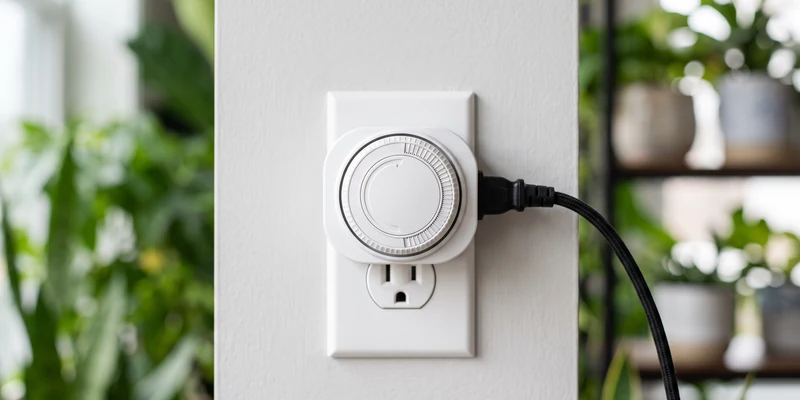
- A mechanical dial timer is the cheapest reliable option, is not affected by power outages beyond the clock drifting, and is genuinely hard to break.
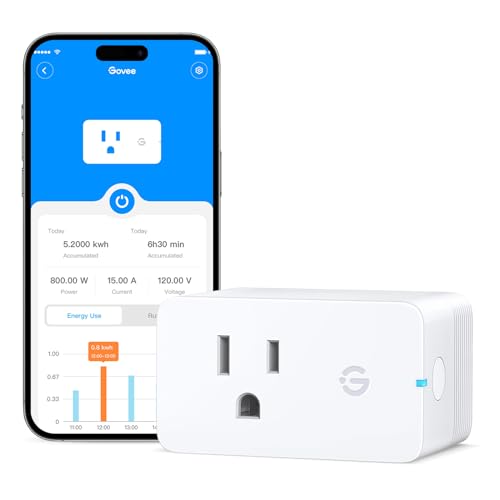
- A Wi-Fi smart plug adds remote control and energy readings, which is useful if the garden is not in a room you visit daily.
The Four Kinds of Timer, and Who Each Suits
Timers for grow lights fall into four families: mechanical dial, digital programmable, Wi-Fi smart plug, and integrated controllers built into grow gear. They differ in precision, how many switching events they allow per day, and what happens when the power blinks.
| Type | Best for | Watch out for |
|---|---|---|
| Mechanical dial | One light, one simple daily cycle, set and forget | Segments are usually 15 or 30 minutes, and the dial hums quietly |
| Digital programmable | Exact times, several on and off events per day | Cheap units lose the program without battery backup |
| Wi-Fi smart plug | Remote schedules, sunrise-linked timing, energy readings | Depends on your network; check behavior after a router restart |
| Multi-outlet timer strip | Several lights or a light plus a pump on one schedule | Total load must stay under the strip’s rating |
| Integrated controller | Tent setups where lights and fans should coordinate | Usually tied to one brand’s ecosystem of gear |
| Timer built into the light | Smart gardens and simple LED panels | Often a countdown from when you press it, not a clock |
That last row matters more than it looks. Many inexpensive LED panels advertise a timer, but it is a countdown that restarts relative to the button press rather than a fixed daily clock. Lose power for an hour and your light day shifts by an hour permanently. An external timer solves that for a few dollars.
How Long Should the Light Stay On?
Light duration depends on what you grow, and every schedule includes darkness. As commonly used starting points: leafy greens and herbs generally do well with around 14 to 16 hours of light per day, seedlings often get 14 to 18, fruiting crops indoors usually land somewhere around 12 to 16, and most houseplants are fine with 8 to 12 hours of supplemental light.
The dark period is not wasted time. Plants carry out processes at night that daylight interrupts, and continuous light is not simply more growth. Some crops tolerate very long days well, others show stress, so if you are unsure, a 16 hours on and 8 hours off cycle is a safe general schedule for edibles. Our guide to how many hours of grow light plants need breaks the ranges down per crop.
Day length is only half the story
Hours on the timer interact with how far the light sits above the canopy. A weak light run for twenty hours does not equal a strong light run for twelve, and stretching the schedule is a common way to compensate for a fixture that is too far away or too small. Fix the distance first, as covered in our guide to how far a grow light should be from plants, then set the hours.
Our Top Picks at a Glance
How we chose: we compared widely available timers on switching accuracy, how many programs they allow per day, what happens after a power interruption, the electrical rating relative to typical LED fixtures, and how forgiving the interface is to program in a dim room. We work from manufacturer specifications and the patterns that repeat across owner feedback rather than any hands on trial of our own.
🏆 Best Overall
A digital programmable outlet timer with several on and off programs per day and a small backup battery that holds the schedule through an outage. Exact minute-level times, a clear display, and a manual override for when you want to check on plants outside the light window. The default choice for a shelf, a tent, or a windowsill setup.

💰 Best Budget Pick
A mechanical dial timer with pin segments. There is nothing to program and nothing to forget: push down the pins for the hours you want the light on and plug it in. Segments are typically 15 or 30 minutes, which is plenty of precision for a grow schedule, and there is no software to misbehave.

📱 Best Smart Option
A Wi-Fi smart plug with app scheduling. Useful when the garden lives in a basement or a spare room you do not pass every day: you can shift the schedule from your phone, set it to follow local sunrise and sunset, and many models report energy use, which answers the running cost question directly.
Ratings, Loads, and Not Overloading a Timer
Check two numbers before plugging anything in: the timer’s rating in amps or watts, and the total draw of everything you want to connect. Household LED grow lights are modest consumers, so a standard timer usually has ample headroom, but stacking several fixtures plus a pump onto one cheap timer is how they fail.
Mechanical and digital outlet timers are commonly rated around 15 amps in North American homes, and the label states it plainly. Add the wattage on each fixture, keep the total comfortably under the rating rather than at it, and avoid daisy-chaining one timer into another power strip into a third. If you are running a lot of gear, a rated multi-outlet timer strip is the cleaner answer.
Water is usually nearby
In hydroponics the timer sits near reservoirs and misting, so use a GFCI protected outlet, keep the timer above the water line rather than on the floor next to a bucket, and let cords hang in a drip loop so any condensation runs off before it reaches a plug. None of this is dramatic; it is just the difference between a tidy setup and a nervous one.
Two More Picks for Bigger Setups
Once you are running more than one fixture, or lights and fans that should cooperate, a single outlet timer stops being enough. These two cover that step up.
🔌 Best for Several Lights at Once
A grounded multi-outlet timer strip puts a shelf of fixtures on one schedule, with a few always-on sockets left over for pumps and fans. Check the combined load against the strip’s rating, mount it off the floor, and one press covers the whole rack.

🎛️ Best Integrated Controller
For a tent, a controller that schedules lights alongside fans and reacts to temperature and humidity beats separate timers doing separate things. AC Infinity’s controllers are the ones most tent growers end up with, and they keep the light cycle and the airflow cycle from working against each other.

Setting a Schedule That Sticks
Pick your light-on time around your own routine, not around sunrise. If the garden is in a living space, having the light come on before you leave and go off in the evening keeps it out of your bedtime; if it is in a bedroom, the reverse. The plants care about consistency and duration, not about matching the sun outside.
Write the schedule on a piece of tape stuck to the timer, because six weeks later nobody remembers what they set. Then leave it alone. Changing the photoperiod every time growth looks slow is one of the main reasons indoor gardens stall, since it takes plants time to settle into any rhythm at all.
Common Mistakes to Avoid
- Relying on a countdown timer built into the light. Countdowns restart from the button press, so any power blip permanently shifts the light day.
- Running lights around the clock. Continuous light is not the same as more growth, and most edible crops do better with a genuine dark period.
- Overloading a cheap timer. Add up the wattage of everything plugged in and stay well under the rating on the label.
- Buying a digital timer without battery backup. Lose power, lose the program, and find out days later.
- Fiddling with the schedule weekly. Constant changes prevent plants from settling. Set it, then change one thing at a time.
- Putting the timer on the floor. Reservoirs leak and spills happen. Mount it above the water line on a GFCI protected outlet.
Where to Go From Here
A timer is only as good as the light it is switching. If your plants are stretching toward the fixture or the leaves look pale despite a long schedule, the fixture is the variable to address, not the hours; our roundup of the best LED grow lights for indoor plants covers what to look for.
If this is a kitchen herb setup rather than a tent, the practical side of daily routines is worth reading next: our guide to growing herbs indoors with grow lights pairs schedules with placement, and how much electricity a smart garden uses answers the question a timer with energy monitoring will eventually raise.
Frequently Asked Questions
How many hours a day should a grow light be on? As a general guideline, around 14 to 16 hours for leafy greens and herbs, 14 to 18 for seedlings, and 8 to 12 for most houseplants. Every schedule should include a dark period; see our grow light hours guide.
Do I really need a timer, or can I switch it manually? Manual switching works until the first late evening or weekend away. Plants respond to a consistent photoperiod, and a timer costs very little compared to any grow light.
Are mechanical or digital timers better for grow lights? Mechanical timers are simple and hard to break, with 15 or 30 minute resolution. Digital ones give exact times and multiple programs but need battery backup to survive an outage. Both are fine for a single fixture.
Can one timer run several grow lights? Yes, if the combined wattage stays comfortably below the timer’s rating. For a shelf of fixtures, a rated multi-outlet timer strip is safer and tidier than adapters stacked on one socket.
Should the light schedule follow the sun? It does not need to. Plants respond to duration and consistency, so pick hours that suit your household and keep them steady.
Will a smart plug keep the schedule if the Wi-Fi drops? Most store the schedule on the plug itself and keep running offline, but behavior differs by model. Check that the schedule is stored locally if the garden is somewhere you rarely check.
The Bottom Line
Any timer beats no timer, so the real question is how much control you want. A digital programmable outlet timer with battery backup covers most indoor gardens, a mechanical dial is the dependable budget answer, and a smart plug earns its place when the garden is out of sight. Set a schedule that includes real darkness, keep the load under the rating, and then leave it alone long enough for the plants to settle in.